
I’ve always been obsessed with the raw power of the terminal. It blows my mind that a tool as complex and responsive as NeoVim, with its intricate UI and instant keyboard handling, lives entirely inside a text shell. I wanted to understand the magic behind that architecture. So, I decided to reverse-engineer the concept and build something fun: a fully functional Snake game, running right in the terminal.
The Heart of the Game: The Main Loop
Every game needs a heart, a core loop that keeps everything in motion. In my snake game, this is a loop in the main.rs file. This loop is responsible for everything: clearing the screen, moving the snake, checking for food, handling player input, and drawing the game state.
Here’s a simplified look at the main game loop:
fn main() {
    // ... initialization ...

    loop {
        // Clear screen and move cursor to top-left
        print!("\x1b[2J\x1b[1;1H");

        // Handle player input
        // ...

        // Move the snake
        // ...

        // Check for apple collisions
        // ...

        // Render the game
        // ...

        // Control game speed
        thread::sleep(time::Duration::from_millis(250));
    }
}
We’ll need a window where the snake will reside a vector for the snake’s body and a random vector for the apple.
let mut window = [[""; WIDTH]; HEIGHT];
let mut snake_body: Vec<[i32; 2]> = Vec::new();
let mut apple = [WIDTH / 2, HEIGHT / 2];
The First Steps: Getting the Snake to Move
The first thing I tackled was the snake itself. I represented the snake as a Vec of coordinates [x, y], Vec<[i32; 2]> . The head of the snake is the first element in the Vec, and the tail is the last.
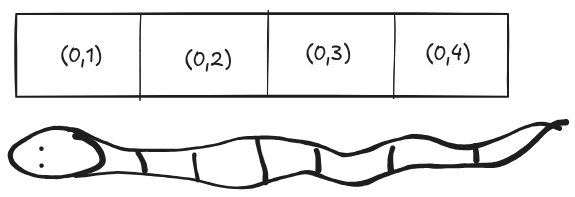
To make the snake move, I have a game loop that runs continuously. In each iteration of the loop, I figure out where the snake’s head should go next based on the current direction. I then add a new head to the front of the Vec and remove the last element of the tail. This gives the illusion of the snake moving forward.
Here’s a little snippet of how I get the next position of the snake’s head:
fn get_next(direction: &Direction, snake_body: &[[i32; 2]]) -> [i32; 2] {
    match direction {
        Direction::Up => {
            let last = snake_body.first().unwrap();
            [last[0], last[1] - 1]
        }
        Direction::Left => {
            let last = snake_body.first().unwrap();
            [last[0] - 1, last[1]]
        }
        Direction::Down => {
            let last = snake_body.first().unwrap();
            [last[0], last[1] + 1]
        }
        Direction::Right => {
            let last = snake_body.first().unwrap();
            [last[0] + 1, last[1]]
        }
    }
}
Now we make the snake move :
let next = get_next(&direction, &snake_body);
snake_body.insert(0, next);
snake_body.pop();
A Snake Needs to Eat: Adding Apples
A snake game wouldn’t be complete without apples! I added an apple to the game, which is just a randomly placed coordinate on the screen. When the snake’s head collides with the apple, I add a head to the snake. This makes the snake grow longer. Then, I generate a new apple at a random location.
if snake_body.first().unwrap() == &[apple[0] as i32, apple[1] as i32] {
    let next = get_next(&direction, &snake_body);
    snake_body.insert(0, next);

    apple = [
        random(WIDTH as u32) as usize,
        random(HEIGHT as u32) as usize,
    ];
}
I even wrote my own little random number generator using the system time. It’s not cryptographically secure, but it’s good enough for a simple game!
fn random(limit: u32) -> u32 {
    let nanos = SystemTime::now()
        .duration_since(UNIX_EPOCH)
        .unwrap()
        .subsec_nanos();
    nanos % limit
}
Taking Control: Handling Keyboard Input
This was probably the most interesting and challenging part of the project so far. I’ve done this on one of my project where i built a low-level keylogger from scratch. https://github.com/oscarmuya/keylogger.rs. Instead of using a library to handle keyboard input, I decided to read the raw input events from the Linux kernel directly. This involved a lot of digging into how the /proc/bus/input/devices and /dev/input/event* files work.
I wrote a separate module, input.rs, that spawns a new thread to listen for keyboard events. It then sends the key presses back to the main game loop through a channel. This way, the game doesn't block while waiting for input.
It was a lot of fun to figure out how to parse the raw event data and map the key codes to the corresponding keys. It’s not the most portable solution, but it was a great learning experience.
With this custom input reader we can now get keyboard presses and control the game:
if let Ok(key) = input_rx.try_recv() {
    match key.as_str() {
        "W" => {
            direction = Direction::Up;
        }
        "A" => {
            direction = Direction::Left;
        }
        "S" => {
            direction = Direction::Down;
        }
        "D" => {
            direction = Direction::Right;
        }
        "ESC" => break, // Quit game
        _ => {}
    }
}
Drawing the game state
Now with the updated game variables we generate the game state representing the snake, the apples and the blank spaces.
for i in 0..(WIDTH * HEIGHT) {
    let x = i % WIDTH;
    let y = i / WIDTH;

    if snake_body.contains(&[x as i32, y as i32]) {
        window[y][x] = "#";
    } else if x == apple[0] && y == apple[1] {
        window[y][x] = "0";
    } else {
        window[y][x] = ".";
    }
}
We then display the game world:
for row in window {
    for item in row {
        print!("{}", item);
    }
    println!();
}
Summary
The entire code for this project is available here https://github.com/oscarmuya/snake.rs
What’s Next?
I’m pretty happy with how the game is turning out. It’s simple, but it’s a solid foundation to build upon. Here are some things I’m thinking of adding next:
Game Over: Right now, the snake can go through walls and itself. I need to add some collision detection to make the game more challenging.
Scoring: It would be cool to keep track of how many apples the player has eaten.
Better Graphics: The current graphics are very basic.