

There is this kind of frustration every developer knows:
You are deep in a project. The terminal is open. Tests are failing, builds are breaking, migrations are half-running, and somewhere in the middle of the chaos, you finally type the command that works.
Maybe it is a long cargo test command with a specific package flag.
Maybe it is a database migration, a deployment check, or a one-off shell pipeline that took five attempts to get right.
The good news is that it works.
Then the moment passes.
A few hours later, you need that exact command again.
You press the up arrow. Nothing useful.
You try history | grep. Too noisy.
You try to reconstruct the command from memory, but memory is not version-controlled you can’t just git checkout.
That problem is exactly why rewind exists.
Command history should understand context
Most shells already have history. This is not news. The issue is that normal shell history is flat. It remembers what you typed, but it usually does not understand the context that made the command useful.
A command is rarely just a command.
It belongs to a directory.
It belongs to a Git repository.
It may only matter inside one project and be meaningless everywhere else.
rewind is a per-project command history tool for your shell. It records the commands you run, where you ran them, the Git repository and branch context, exit status, duration, and timestamp. Then it lets you search and replay that history directly from the terminal.
In other words, rewind gives your terminal memory with context.
How to install rewind
Installing rewind is straightforward:
curl -fsSL https://raw.githubusercontent.com/oscarmuya/rewind/main/install.sh | shThe installer installs two binaries: rw and rw-daemon .
rw is the user-facing CLI. It handles search, recent command replay, setup, status checks, and manual recording.
rw-daemon is the background process used by shell integrations to persist command history quickly.
After installing, enable automatic shell recording:
rw init --installRestart your shell, or source your shell startup file, and rewind starts recording interactive commands automatically.
It supports bash , zsh and fish for now.
Search, Replay, and Recover Your Flow
The simplest way to use rewind is to run:
rwPress enter or click to view image in full size
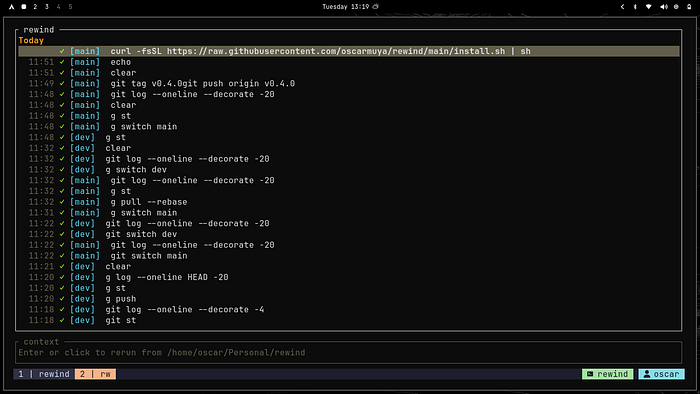
That opens the recent-command picker.
If you need plain output instead of the interactive interface?
rw --plain
 rw --plain --limit 20
Need only commands from the current Git repository?
rw --repoNeed only commands from the current directory?
rw --cwdNeed only commands from the current branch?
rw --branchNeed to find failed commands?
rw --failNeed successful ones?
rw --okFilters can be combined:
rw --repo --branch --fail --limit 10That is where rewind starts to feel less like shell history and more like a project-aware command timeline.
Fuzzy search when you remember fragments
Sometimes you do not remember the whole command. You only remember one word.
Maybe it had migrate.
Maybe it had rg TODO.
Maybe it was the command that failed before the fix.
Use:
rw searchOr start with a query:
rw search cargoFor scripts and automation, use plain output:
rw search cargo --plain
rw search cargo --plain --limit 20
The result is a smoother loop: search, select, rerun, continue.
Why this matters
The best developer tools often feel obvious after you start using them.
A formatter saves you from arguing with whitespace. A fuzzy finder saves you from remembering exact paths. rewind saves you from losing the commands that already worked.
That is the real value of rewind. It gives your terminal a memory that understands where you are.
Explore the project github repo here: github.com/oscarmuya/rewind
View full medium blog here: medium.com/@techmonthly